
一般虚拟主机是不支持绑定到子目录的,这时候该怎么办呢,其实还可以利用伪静态实现将域名或二级域名绑定到子目录。
如果是Apache环境,在站点根目录新建一个文件命名为:.htaccess,如果已有直接修改增加
下面是123.pbhtml.cn域名绑定到子目录dh
RewriteEngine On
RewriteBase /

# 绑定123.pbhtml.cn到子目录dh

RewriteCond %{HTTP_HOST} ^123\.pbhtml\.com$ [NC]
RewriteCond %{REQUEST_URI} !^/dh/
RewriteRule ^(.*)$ dh/$1?Rewrite [L,QSA]

#可以绑定多个 只需重复上三行代码并更改一下域名、目录名 就好了
如果是windows服务器,在站点根目录新建web.config文件,参考以下
<?xml version="1.0" encoding="UTF-8"?>
<configuration>
    <system.webServer>
        <rewrite>
            <rules>
                <rule name="Imported Rule 1" stopProcessing="true">
                    <match url="^(.*)$" ignoreCase="false" />
                    <conditions logicalGrouping="MatchAll">
                        <add input="{REQUEST_FILENAME}" matchType="IsDirectory" ignoreCase="false" negate="true" />
                        <add input="{REQUEST_FILENAME}" matchType="IsFile" ignoreCase="false" negate="true" />
                    </conditions>
                    <action type="Rewrite" url="index.php?s={R:1}" appendQueryString="true" />
                </rule>
                <rule name="Imported Rule 2" stopProcessing="true">
                    <match url="^(.*)$" ignoreCase="false" />
                    <conditions logicalGrouping="MatchAll">
                        <add input="{HTTP_HOST}" pattern="^123\.pbhtml\.com$" />
                        <add input="{URL}" pattern="^/dh/" ignoreCase="false" negate="true" />
                    </conditions>
                    <action type="Rewrite" url="dh/{R:1}?Rewrite" appendQueryString="true" />
                </rule>
            </rules>
        </rewrite>
    </system.webServer>
</configuration>
完成以上步骤就可以实现访问123.pbhtml.cn直接对应子目录dh了。
站长补充
pbootcms在使用中发现子目录对应的站点url中会自动带上目录名称,例如上面的dh,变成123.pbhtml.cn/dh/
只要给indx.php里增加下面一段代码即可解决(在线升级后需要重新添加或者升级时不要选择覆盖这个文件)
// 强制定义入口文件地址为空
define('SITE_INDEX_DIR', '');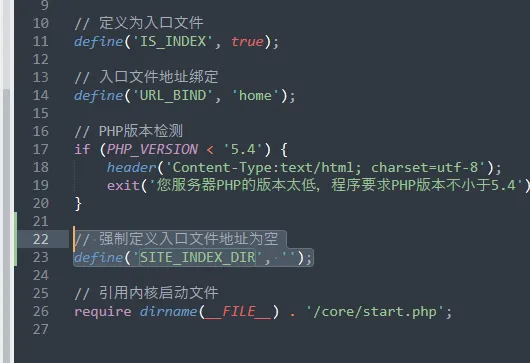


 微信扫码咨询